

In the labyrinthine world of digital marketing, where algorithms hum like distant stars and data points twinkle like fireflies in the night, there exists a peculiar breed of creators—authors who, despite their mastery over prose and poetry, find themselves entangled in the web of spreadsheets and conversion rates. They are the wordsmiths who can craft a sentence so evocative it makes readers weep, yet when faced with the cold, unfeeling gaze of a Meta Ads Pixel setup, their confidence crumbles like a poorly baked soufflé. If this sounds like you, fear not. This guide is your lifeline, your Rosetta Stone, your cheat code to unlocking the power of Meta Ads without needing a PhD in statistical alchemy.
The Pixel Paradox: Why Authors Dread the Setup
Authors are, by nature, storytellers. Their minds are wired to weave narratives, to evoke emotions, and to transport readers to other worlds. But the Meta Ads Pixel? It’s a different kind of beast entirely. It doesn’t care about the elegance of your prose or the depth of your character arcs. It demands precision. It thrives on numbers. And to the uninitiated, it can feel like trying to decipher a Shakespearean sonnet written in binary code.
Consider this: You’ve spent months, perhaps years, perfecting your manuscript. You’ve agonized over every comma, every metaphor, every twist of the plot. Then, in a moment of inspiration (or desperation), you decide to run a Meta ad to promote your latest book. You create a campaign, upload your ad creative, and—oh no—where’s the pixel? Where’s the tiny, invisible tracker that will tell you whether your ad is converting readers into buyers? The panic sets in. Your heart races. Your palms sweat. You’re not just an author anymore; you’re a detective in a noir film, hunting for clues in a world where the only witnesses are lines of code.
This is the pixel paradox: a tool designed to empower creators is often the very thing that leaves them feeling powerless. But here’s the secret—it doesn’t have to be this way. The Meta Ads Pixel is not a riddle wrapped in a mystery inside an enigma. It’s a tool. And like any tool, it’s only as intimidating as you allow it to be.
The Pixel’s Secret Language: Decoding the Jargon
Before you can wield the Meta Ads Pixel like a seasoned marketer, you need to speak its language. And no, we’re not talking about the kind of language you’d find in a Jane Austen novel. We’re talking about terms like event codes, standard events, custom conversions, and pixel ID. It’s enough to make even the most seasoned author’s head spin.
Let’s break it down. The Meta Ads Pixel is a piece of code that you install on your website. It tracks the actions visitors take—whether they click a link, add a book to their cart, or (hopefully) complete a purchase. These actions are called events. The most common events are PageView (someone lands on your site), ViewContent (they look at a specific page, like your book’s sales page), AddToCart (they’re interested enough to throw your book in their cart), and Purchase (they’ve taken the plunge and bought it).
But here’s where it gets interesting. Meta doesn’t just track these events for the sake of tracking. It uses them to optimize your ads. If you’re running an ad to promote your book, Meta will show it to people who are most likely to purchase it—not just click on it. That’s the magic of the pixel. It turns your website into a treasure trove of data, and Meta’s algorithms into your personal fortune tellers.
Installing the Pixel: A Step-by-Step Odyssey
Now that you’re fluent in pixel-speak, it’s time to install the thing. Don’t worry—this isn’t a quest that requires a magic sword or a map drawn by a one-eyed cartographer. It’s a straightforward process, albeit one that demands your undivided attention. Here’s how to do it without losing your sanity.
First, head to your Meta Ads Manager. If you don’t have one, create it. (Yes, even authors need to play the game.) Once you’re in, navigate to the Events Manager. This is where the pixel lives. Click on Add Events, then select From a New Website. Meta will generate a pixel ID for you—a string of numbers that looks like it was pulled from a dystopian sci-fi novel. Copy this ID. You’ll need it.
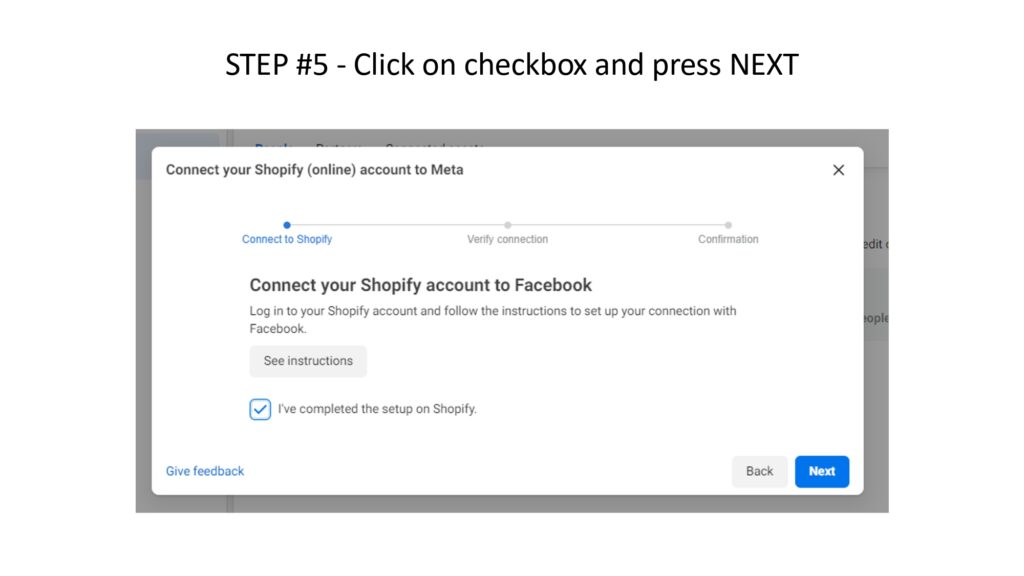
Next, you need to install the pixel on your website. If you’re using a platform like WordPress, Shopify, or Squarespace, Meta offers plugins or integrations that do the heavy lifting for you. Simply paste your pixel ID into the designated field, and—voilà—your pixel is installed. If you’re using a custom-coded website, you’ll need to add the pixel code to the header of your site. This is where things can get tricky, but fear not. Meta provides a Pixel Helper tool—a browser extension that checks if your pixel is installed correctly. It’s like having a tiny, digital Sherlock Holmes sniffing out your code’s flaws.
Once the pixel is installed, it’s time to test it. Use the Pixel Helper to verify that it’s firing on the right pages. Click around your site. Add a book to your cart. (Don’t worry, we won’t judge.) If the pixel is working, you’ll see little green checkmarks popping up like fireworks. If not? Double-check your code. Triple-check it. And if all else fails, consult the Meta Ads Pixel documentation. It’s dry, it’s dense, and it’s your best friend in this pixelated journey.
Events: The Plot Twists of Your Marketing Story
Now that your pixel is installed, it’s time to define the events that matter most to your authorly ambitions. Think of these events as the chapters in your marketing story. Each one is a crucial plot point that helps Meta understand what your readers are doing—and what they’re not doing.
Start with the basics. The PageView event is your opening scene. It tells Meta that someone has landed on your website. Simple, but essential. Next, the ViewContent event is where you specify which pages are most important. Is it your book’s sales page? Your author bio? Your blog? Tag these pages with the ViewContent event, and Meta will know to prioritize them in its algorithmic matchmaking.
Then comes the AddToCart event. This is where the tension builds. Someone is interested enough in your book to throw it into their cart. They’re one step away from purchasing. But will they follow through? The Purchase event is the climax of your story. It’s the moment of truth, the payoff, the ta-da! that makes all your hard work worthwhile.
But why stop there? Meta allows you to create custom events—events that are unique to your authorly needs. Maybe you want to track how many people download your free sample chapter. Maybe you want to know how many readers sign up for your newsletter. These are the subplots of your marketing narrative, the side quests that add depth to your story.

Optimizing Your Ads: The Art of the Algorithm
With your pixel installed and your events defined, it’s time to let Meta do its thing. But here’s the kicker: the pixel doesn’t just track data. It optimizes your ads. And that’s where the real magic happens.
When you create a Meta ad, you’ll be asked to choose an optimization goal. This is the action you want Meta to prioritize. If you’re running an ad to promote your book, you might choose Conversions—meaning Meta will show your ad to people who are most likely to purchase. Or you might choose Traffic, if your goal is to drive more visitors to your website. The choice depends on your story. What’s the ending you’re aiming for?
But optimization isn’t just about choosing the right goal. It’s about refining your audience. Meta’s algorithms are like a matchmaker with a PhD in psychology. They’ll pair your ad with the people most likely to engage with it. But you can help them along by creating lookalike audiences. These are groups of people who resemble your existing customers or website visitors. Meta finds them by analyzing the data from your pixel, and suddenly, your ad is being shown to a whole new audience of potential readers.
And let’s not forget about retargeting. This is the art of bringing back the readers who almost bought your book but got distracted by a shiny object (or, let’s be honest, by life). With retargeting, you can show ads to people who visited your site but didn’t complete a purchase. It’s like leaving breadcrumbs for Hansel and Gretel, except instead of leading them into a witch’s lair, you’re leading them back to your book’s sales page.
The Author’s Advantage: Why Writers Excel at Pixel Mastery
At this point, you might be thinking, This all sounds well and good, but I’m an author, not a data scientist. And you’re right. But here’s the secret: authors have a unique advantage when it comes to Meta Ads Pixel mastery. They understand narrative. They understand pacing. They understand the power of a well-timed reveal.
The pixel is just another story waiting to be told. Each event is a character. Each conversion is a plot twist. And the data? That’s your feedback loop, your editor, your beta reader. It tells you what’s working and what’s not. It helps you refine your story until it’s irresistible.
So don’t fear the pixel. Embrace it. Learn its language. Install it with care. Define your events with purpose. And let Meta’s algorithms do the heavy lifting. Because at the end of the day, you’re not just an author. You’re a storyteller. And the Meta Ads Pixel? It’s just another tool in your arsenal.
The journey from pixel-phobe to pixel-pro might feel daunting, but remember: every expert was once a beginner. Every bestselling author started with a blank page. And every Meta Ads Pixel setup begins with a single line of code. So take a deep breath. Install the pixel. Define your events. And watch as your book finds its way into the hands of readers who will cherish it as much as you do. The story of your success is just beginning.


Leave a Comment