

In the vast tapestry of design, creating an engaging user experience (UX) and user interface (UI) requires a profound understanding of fundamental art principles. Design is more than mere aesthetics; it is the careful orchestration of several elements that breathe life into a project. When the principles of design are mastered, they transform an ordinary interface into an interactive masterpiece—a harmonious ballet where each element plays its role. This article delves into the key elements in UX/UI design you should be intimately familiar with, serving as a palette from which your creativity can unfold.
1. Balance: The Scale of Visual Equilibrium
Imagine a perfectly balanced scale, with each side holding equal weight; such is the essence of balance in design. It refers to the distribution of visual elements across a layout. In the context of UX/UI, balance can be symmetrical or asymmetrical. Symmetrical balance offers a sense of formality and stability, akin to the classical architecture of ancient Greece, while asymmetrical balance exemplifies dynamism and energy, like a carefully arranged wildflower bouquet. Achieving balance ensures that a user’s attention is guided smoothly through the interface, facilitating an uninterrupted experience.
2. Contrast: The Power of Dissonance
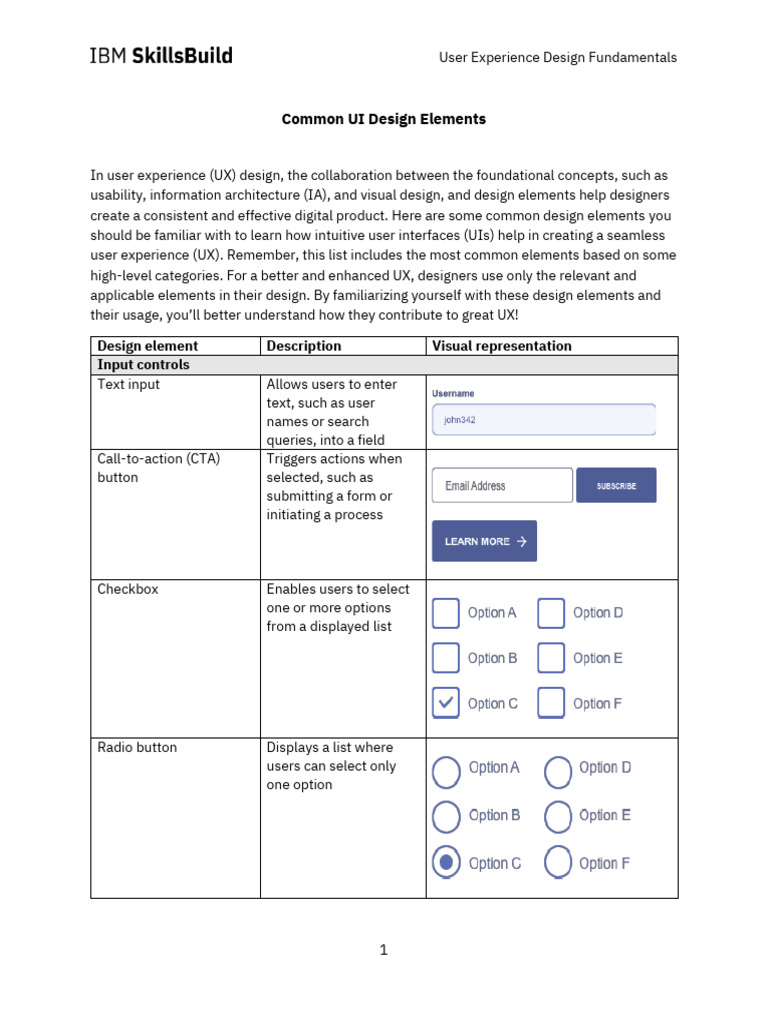
Contrast is the artist’s chiaroscuro, a technique that creates depth and interest through juxtaposition. In UX/UI, this principle manifests through contrasting colors, shapes, and sizes, elevating elements against each other to draw attention or convey hierarchy. For instance, a bright call-to-action button on a muted background acts as a lighthouse guiding the user through a stormy sea of information. Properly utilizing contrast not only enhances readability but also supports usability, ensuring that critical information shines clearly amidst the chaos.
3. Emphasis: The Spotlight on Design Elements
Every design has its heroes—those elements that deserve the spotlight for their pivotal roles. Emphasis is the principle that helps identify and highlight these key components. Think of a theatrical production where the lead actor is illuminated on stage, while the ensemble cast fades into the shadows. In design, this could be achieved through size, color, or placement. An emphasized element not only commands attention but also guides users’ actions, leading them toward desired interactions. This could be exemplified by a large, colorful button that invites users to “Subscribe Now!”—an invitation that resonates through the hush of an otherwise muted canvas.
4. Hierarchy: The Structure of Visual Navigation
Hierarchy is the backbone of design, dictating the arrangement of information and guiding the user’s eye from one component to another. It is akin to the hierarchy of elements in a symphony where the conductor directs attention to various sections. A well-structured hierarchy utilizes size, color, and spacing to steer the user through complex datasets or information-heavy interfaces. A clear hierarchy not only enhances comprehension but also instills a sense of order and logic in the user’s journey, allowing them to navigate confidently and purposefully.
5. Alignment: The Art of Precision
Alignment is the invisible thread that binds design elements together, creating a cohesive composition. Every element in a design should relate to another, maintaining a unified flow that guides the user’s gaze. This principle acts much like a beautifully arranged table setting, where each item complements another in both function and aesthetic appeal. Misalignment creates disarray and can distract or confuse the user, while precise alignment fosters a polished and professional appearance, ensuring that users feel at ease while interacting with your design.
6. Repetition: The Rhythm of Consistency
Repetition is the heartbeat of design, providing rhythm and cohesion throughout an interface. Much like a musical motif that recurs throughout a symphony, repeated elements reinforce a brand identity and create user familiarity. This could manifest through recurring colors, shapes, or typography. A consistent palette or style instills trust and recognition, making users more comfortable as they navigate various aspects of your design. Thus, repetition transforms disparate components into a harmonious melody that resonates with users.
7. White Space: The Breathing Room
White space—or negative space—is not merely void; it is profound and purposeful. Much like pauses in a conversation that enrich communication, white space plays a pivotal role in design by allowing elements room to breathe. By judiciously employing white space, designers can convey elegance and sophistication, enhancing any design’s legibility and clarity. It minimizes clutter and helps users focus on important interactions rather than overwhelming them. Just as silence accentuates sound, white space elevates design to a new level of finesse.
8. Unity: The Cohesive Thread
Unity is the overarching principle that pulls together all other design elements, ensuring that they work harmoniously as a single entity. It is akin to the theme of a compelling narrative that binds distinct chapters into a cohesive story. In UX/UI design, unity can be forged through consistent use of colors, typography, imagery, and elements that speak to the same design language. When unity prevails, users experience a seamless interaction, as their journey through the design feels connected and purposeful.
In conclusion, mastering the principles of design is a transformative endeavor for any aspiring UX/UI designer. Each element, be it balance, contrast, or unity, plays a vital role in creating an engaging and intuitive experience. When these principles are applied thoughtfully, they elevate a design beyond the ordinary, crafting an experience that is not only functional but also memorable. Thus, arm yourself with these art fundamentals and embark on your journey—forge designs that resonate, connect, and inspire.






Leave a Comment