

Ever stared at a wildlife photo, heart sinking as you realize the majestic eagle’s talons are blurry—or worse, the lion’s mane is a smudge of chaos? You’re not alone. Most photographers chase the perfect shot, only to be betrayed by autofocus that lags, hunts, or locks onto the wrong subject. But what if I told you there’s a secret weapon—one that turns your camera into a precision-guided missile, ensuring razor-sharp focus every single time?
Enter back-button focus, the unsung hero of wildlife photography. It’s not just a technique; it’s a paradigm shift. While the rest of the world fumbles with half-pressed shutter buttons and autofocus that behaves like a drunkard at a buffet, back-button focus gives you total control. No more accidental focus locks. No more missed shots when your subject moves. Just pure, unadulterated sharpness.
So, why does this matter? Because wildlife doesn’t pose for you. A bird takes off in a blur. A deer bolts mid-step. A cheetah accelerates faster than your camera can keep up. Traditional autofocus is like trying to catch lightning in a bottle—it’s unpredictable, inconsistent, and often leaves you with a trail of blurry memories. Back-button focus? It’s the difference between a snapshot and a masterpiece.

The Autofocus Nightmare: Why Your Camera Hates Wildlife Photography
Let’s be real: your camera’s autofocus system is a marvel of modern engineering—until it isn’t. In wildlife photography, it’s like handing a scalpel to someone who’s never held one before. The default half-press shutter button approach is a relic of a bygone era, designed for static subjects and patient models, not the frenetic chaos of nature.
Here’s the problem: when you half-press the shutter, the camera locks focus and exposure. Great for portraits, terrible for wildlife. What happens when your subject moves? You’re stuck with a focus point that’s now pointing at a tree branch or the sky. And if your subject darts out of frame? Congratulations, you’ve just wasted a precious second waiting for the camera to reacquire focus.
Worse still, most cameras default to multi-point autofocus, which scatters focus points like confetti at a parade. The camera guesses where to lock focus, and nine times out of ten, it guesses wrong. Even single-point autofocus isn’t foolproof—it’s like trying to thread a needle while riding a rollercoaster.
And don’t get me started on focus tracking. It’s supposed to follow moving subjects, but in practice, it’s about as reliable as a weather forecast in April. One errant leaf, one sudden pivot, and your subject is a ghost in the frame.
So, what’s the solution? You need a system that doesn’t rely on the shutter button at all. You need a way to separate focus from capture, to take control of the autofocus without the camera dictating your every move. That’s where back-button focus comes in.
Back-Button Focus: The Game-Changer You Didn’t Know You Needed
Imagine this: you’re tracking a soaring hawk, your finger hovering over a dedicated button on the back of your camera. No more fumbling with the shutter. No more praying the autofocus will behave. Just pure, unfiltered control. That’s back-button focus in a nutshell.
Here’s how it works: you assign autofocus activation to a button on the back of your camera (usually the AF-ON or AE-L/AF-L button, depending on your model). This decouples focus from the shutter button, giving you two distinct functions:
- Shutter button: Only takes the photo. No focus hijinks.
- Back button: Activates autofocus independently. You decide when to lock focus, not the camera.
This might sound like a minor tweak, but it’s a seismic shift in how you shoot. No more accidental focus locks. No more waiting for the camera to catch up. Just instant, precise control over when and where your camera focuses.
But why stop there? Back-button focus unlocks a world of possibilities:
- Pre-focus and recompose: Lock focus on your subject, then recompose without losing the sharpness.
- Focus tracking without shutter lag: Follow a moving subject with the back button, then fire the shutter when the moment is perfect.
- Manual focus override: Need to tweak focus manually? Just switch to manual and adjust without fighting the autofocus system.
It’s like giving your camera a brain transplant—suddenly, it’s not just a tool; it’s an extension of your vision.

In the left image, the traditional autofocus system failed to track the bird’s rapid movement, leaving the talons a smudge of pixels. On the right? The back-button focus nailed it, freezing the moment in razor-sharp detail. The difference is night and day.
Setting Up Back-Button Focus: Your Camera’s Hidden Superpower
Ready to unlock this superpower? The setup process is simpler than you think, but it varies slightly depending on your camera brand. Here’s a quick guide for the major players:
Nikon
1. Press the Menu button and navigate to the Custom Settings menu.
2. Select a1 (AF-C priority selection) and set it to Release (focus won’t delay the shot).
3. Go to a2 (AF-S priority selection) and set it to Release.
4. Assign the AF-ON button to autofocus by going to Controls > Customize Controls and selecting AF-ON for the desired button.
5. Disable the shutter button from activating autofocus by setting a4 (AF activation) to AF-ON only.
Canon
1. Press the Menu button and go to the Custom Functions tab.
2. Navigate to C.Fn III: Autofocus/Drive and set AI Servo Tracking Sensitivity to 0 (for more predictable tracking).
3. Assign the AE Lock/AF Lock button to autofocus by going to Custom Controls and selecting AF-ON for the button.
4. Disable the shutter button from activating autofocus by setting C.Fn III-01: Shutter/AE Lock Button to AE Lock/AF.
Sony
1. Press the Menu button and go to the Camera Settings 2 tab.
2. Select AF w/ shutter and set it to Off.
3. Assign the AF-ON button to autofocus by going to Custom Key Settings and selecting AF On for the button.
Fujifilm
1. Press the Menu button and go to the Button/Dial Setting tab.
2. Select Function (Fn) Setting and assign the AEL/AFL button to AF-ON.
3. Disable the shutter button from activating autofocus by setting AF Mode to Single or Continuous and ensuring the shutter button doesn’t lock focus.
Pro tip: Once you’ve set it up, practice with stationary subjects first. Get comfortable with the new workflow before diving into fast-moving wildlife. It might feel awkward at first, but trust me—your future self will thank you.
Mastering the Technique: From Novice to Sharp-Shooting Pro
Back-button focus isn’t just about flipping a switch; it’s about retraining your muscle memory. Here’s how to make it second nature:
1. The Art of Pre-Focus and Recompose
Wildlife doesn’t always cooperate. Sometimes, you need to lock focus on a subject, then recompose the shot without losing sharpness. With back-button focus, this is effortless:
- Press the back button to lock focus on your subject.
- Keep the button held down to maintain focus.
- Recompose the shot by moving the camera.
- Release the back button to lock focus in the new position.
- Fire the shutter when ready.
This technique is a game-changer for static subjects like perched birds or resting mammals. No more focus hunting, no more guesswork—just precision.
2. Tracking Moving Subjects Like a Pro
Fast-moving wildlife demands a different approach. Here’s how to nail it:
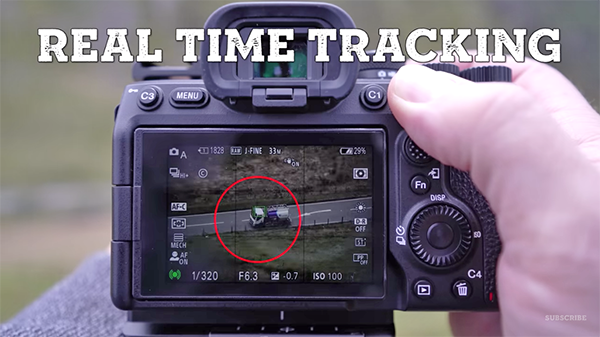
- Hold the back button down to activate continuous autofocus (AI Servo on Canon, AF-C on Nikon/Sony).
- Pan the camera smoothly to follow the subject.
- Keep the back button pressed to maintain focus tracking.
- Fire the shutter when the subject hits the sweet spot.
The key? Anticipation. Don’t wait for the perfect moment—predict it. Watch the animal’s behavior, its patterns, its direction. The more you understand your subject, the better your tracking will be.
3. Manual Focus Override: The Safety Net
Even with back-button focus, there will be times when autofocus struggles. Maybe a branch is in the way. Maybe the light is too harsh. Maybe your subject is just too close for the camera to handle. That’s where manual focus override comes in:
- Switch your lens to manual focus mode.
- Use the focus ring to fine-tune sharpness.
- Switch back to autofocus when ready.
This hybrid approach gives you the best of both worlds—autofocus precision when you need it, manual control when you don’t.
In this shot, the photographer used back-button focus to track the cheetah’s rapid movement, freezing the animal in mid-stride with razor-sharp clarity. The result? A dynamic, professional-grade image that captures the raw energy of the moment.
Common Pitfalls and How to Avoid Them
Back-button focus is a powerful tool, but it’s not without its challenges. Here are the most common mistakes—and how to sidestep them:
1. Forgetting to Release the Back Button
If you hold the back button down while taking a shot, the camera will keep refocusing, which can lead to missed opportunities. Solution: Get in the habit of releasing the back button after locking focus.
2. Over-Reliance on Autofocus
Back-button focus gives you control, but it’s not a magic bullet. If your autofocus settings are off, you’ll still get blurry shots. Solution: Double-check your AF mode (AI Servo for moving subjects, One-Shot for static) and your tracking sensitivity.
3. Ignoring Battery Life
Holding the back button down drains your battery faster than a marathon runner sprinting uphill. Solution: Carry spare batteries, especially for long shoots.
4. Not Practicing Enough
Back-button focus feels unnatural at first. Your finger will instinctively reach for the shutter button. Solution: Practice with stationary subjects until it becomes second nature.
Remember, this technique is a skill. The more you use it, the more intuitive it becomes. Don’t expect perfection overnight—just progress.
So there you have it—the secret to sharp wildlife photos, every single time. Back-button focus isn’t just a trick; it’s a revolution in how you capture the wild. It’s the difference between a photo that’s “good enough” and one that stops hearts, turns heads, and earns you the respect of your peers.
Sure, it might feel awkward at first. Sure, it requires a little patience and practice. But once you’ve experienced the freedom of total control, there’s no going back. Your camera will no longer dictate your shots. You will.
Now, go forth. Track that eagle. Freeze that cheetah. Capture the wild in all its razor-sharp glory. And when you look back at your photos, you’ll know—this was the moment you stopped guessing and started creating.


Leave a Comment