
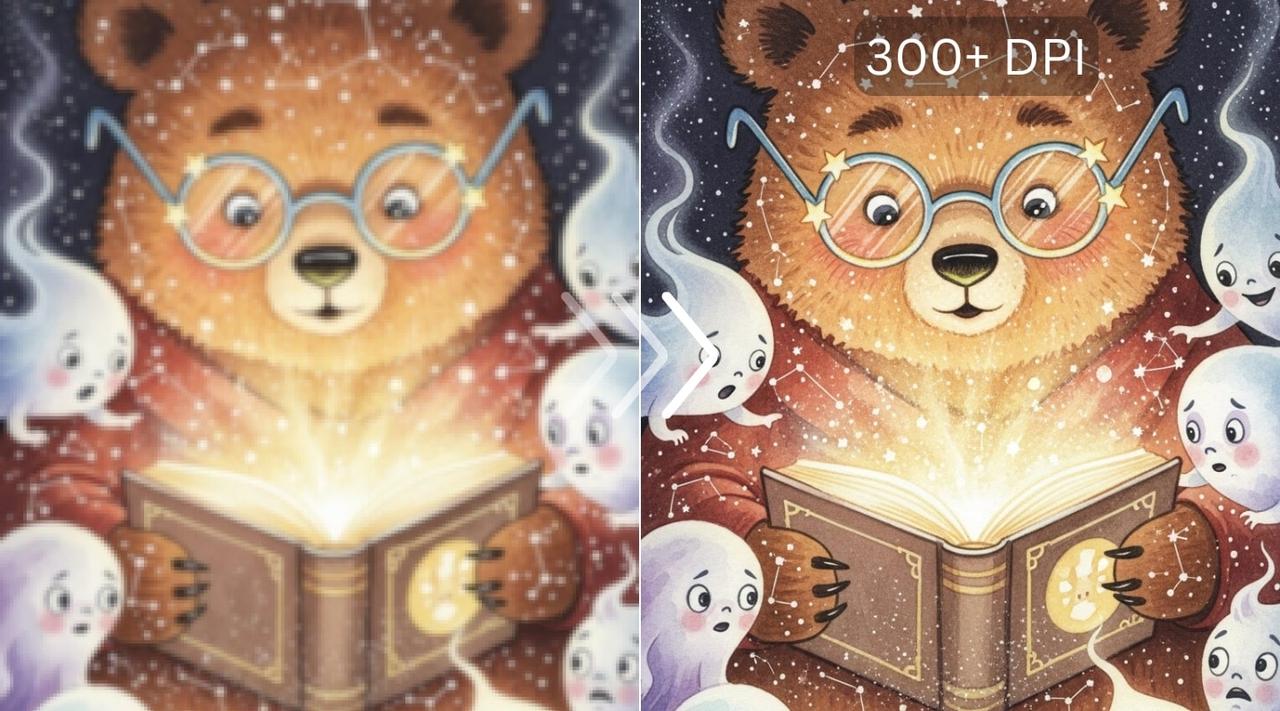
Have you ever stood before a breathtaking AI-generated masterpiece, only to realize it’s trapped in the confines of your screen—pixelated and hesitant when you dream of adorning a gallery wall or gracing the cover of a glossy magazine? The frustration is real. You’ve poured hours into crafting the perfect digital canvas, only to watch your vision dissolve into jagged artifacts the moment you attempt to scale it beyond a modest print size. But what if I told you that the days of pixelated prints are numbered? What if the solution lies not in waiting for technology to catch up, but in wielding the tools already at your fingertips with precision and flair?
Upscaling AI art for massive prints without pixelation isn’t just a technical challenge—it’s an art form in itself. It demands a blend of creativity, patience, and an intimate understanding of how digital pixels transform into tangible beauty. Whether you’re an artist pushing the boundaries of generative AI, a designer crafting visuals for high-impact campaigns, or simply someone who refuses to let their digital dreams remain confined to a screen, mastering the upscaling process can unlock a world where your art isn’t just seen—it’s experienced.
The Pixel Paradox: Why AI Art Crumbles at Scale
At the heart of every AI-generated image lies a lattice of pixels—tiny, meticulously calculated squares that, when viewed up close, reveal the illusion of seamless artistry. But scale that lattice too far, and the illusion shatters. The paradox is striking: the more detail your AI model generates, the more pronounced the pixelation becomes when stretched beyond its native resolution. This isn’t merely a limitation of hardware or software; it’s a fundamental tension between the algorithmic precision of AI and the organic fluidity of print media.
Consider the workings of a neural network trained on millions of images. It excels at interpolating patterns, textures, and even emotions from abstract prompts. Yet, when tasked with extrapolating beyond its training data—say, doubling or quadrupling the resolution of an intricate portrait or a sprawling fantasy landscape—it often resorts to duplicating pixels or inventing details that never existed. The result? A print that looks like it was stretched on a medieval rack, its once-vibrant colors now marred by blurry smudges and unnatural edges.
Enter the Upscaling Alchemists: Tools That Defy the Odds
Fortunately, the digital renaissance has birthed a new breed of tools—upscaling alchemists, if you will—that transmute pixelated chaos into crisp, print-ready gold. These aren’t your grandmother’s image editors. They’re sophisticated, AI-driven platforms that don’t just resize your art; they reimagine it. Tools like Topaz Gigapixel AI, Adobe’s Super Resolution, and Leonardo.Ai’s Universal Upscaler don’t merely stretch pixels—they reconstruct them, infusing your artwork with lifelike detail and depth that feels almost supernatural.
Take Topaz Gigapixel AI, for instance. This powerhouse leverages deep learning to analyze your image, identify edges, textures, and patterns, and then intelligently fill in the gaps with plausible, high-fidelity details. It’s as if the algorithm has developed a sixth sense for what your art *should* look like at higher resolutions, even if the original data never existed. The result? Prints that retain the soul of your AI creation while flaunting a clarity that rivals traditional photography.
The Art of the Upscale: A Step-by-Step Odyssey
Upscaling isn’t a one-click wonder—it’s a deliberate journey, a dance between technology and intuition. The first step is preparation. Before you even touch an upscaling tool, ensure your AI art is in its prime. Clean up any artifacts, adjust the contrast, and refine the colors. A well-tuned image serves as a canvas for the upscaler’s magic, allowing it to work its wonders without battling pre-existing flaws.
Next, choose your weapon wisely. Not all upscalers are created equal. Some excel at preserving fine details, like the delicate strands of hair in a portrait or the intricate embroidery on a fantasy gown. Others prioritize color accuracy or texture fidelity. Experiment with different tools to find the one that harmonizes with your artistic vision. And don’t be afraid to combine techniques—upscale in stages, using one tool to refine edges before passing the baton to another for final polish.
The third step is patience. Upscaling, especially for massive prints, can be a time-consuming endeavor. A 4K image might take minutes to process, while an 8K behemoth could demand hours. But the wait is worth it. Think of it as slow-cooking a gourmet meal—every second invested in the process enhances the final flavor.
Finally, embrace the iterative process. Upscaling is rarely perfect on the first try. Zoom in, scrutinize the details, and tweak as needed. Does the upscaled texture look too smooth? Does an edge appear unnaturally sharp? Adjust the settings, reprocess, and repeat. The goal isn’t just to upscale—it’s to elevate your art to a level where it commands attention, whether on a billboard or in the palm of your hand.
Beyond the Basics: Advanced Techniques for the Discerning Creator
For those who refuse to settle for the ordinary, advanced upscaling techniques offer a gateway to unparalleled print quality. One such technique is multi-pass upscaling, where you upscale an image incrementally, doubling the resolution in stages. This method reduces the strain on the algorithm, allowing it to generate more accurate details at each step. It’s like teaching a child to walk before they run—each stage builds a stronger foundation for the next.
Another powerful strategy is mask-based upscaling. By isolating specific elements of your image—such as a subject’s face or a focal point in a landscape—and upscaling them separately, you can ensure that critical details remain sharp while the background retains its texture. This technique is particularly useful for portraits or images where certain elements demand extra attention.
Don’t overlook the power of manual refinement, either. Even the most advanced upscalers can stumble when faced with complex textures or unconventional compositions. In these cases, a gentle touch with tools like Photoshop’s healing brush or the clone stamp can work wonders. The key is to blend your interventions seamlessly, ensuring that the upscaled image feels cohesive and intentional.
The Printed Dream: Preparing Your Upscaled Art for the Real World
Upscaling is only half the battle. To ensure your AI art thrives in the physical realm, you must consider the nuances of print production. Start by selecting the right file format. TIFF and PNG are ideal for preserving detail, while JPEG can introduce compression artifacts if not handled carefully. Next, calibrate your color space. sRGB is safe for most prints, but if you’re aiming for gallery-quality output, consider Adobe RGB or ProPhoto RGB to capture a wider gamut of colors.
Resolution is another critical factor. For a crisp print, aim for at least 300 DPI (dots per inch) at the final print size. A 24×36-inch poster, for example, would require an image resolution of 7200×10800 pixels. If your upscaled image falls short, don’t despair—some printers offer interpolation services that can help bridge the gap, though they’re no substitute for a properly upscaled file.
Finally, collaborate with your print provider. Discuss paper types, ink formulations, and finishing options. A matte finish can soften the impact of any residual pixelation, while a glossy finish can make colors pop. The right combination of settings can transform your upscaled art from a digital approximation into a tactile masterpiece.
The journey from pixelated prototype to print-ready masterpiece is one of transformation—a metamorphosis that turns lines of code into living, breathing art. It’s a process that demands both technical prowess and artistic intuition, a delicate balance between the cold precision of algorithms and the warm, organic beauty of human creativity. So the next time you find yourself staring at an AI-generated image, dreaming of its potential on a grand scale, remember: the tools to make it happen are already here. All that’s left is for you to wield them with purpose, patience, and a touch of audacity.
Your art wasn’t meant to stay small. It was meant to be seen, felt, and experienced in all its glory. Now go forth and scale it to the heavens.


Leave a Comment